
Purpose
The purpose of this guideline is to provide information on office ergonomics, risk management and equipment layout.
Scope
This guideline applies to all workers of our company working in an office environment.
Guidelines
General requirements
Careful planning is needed when establishing an office or assessing ongoing needs. This helps to ensure workers are not exposed to health and safety risks.
Different activities require different amounts of space to perform them safely. For example, writing can be performed on a small bench area while collating needs a larger working space.
Adequate space should be provided for easy access to equipment, storage areas, workstations, and amenities. The design of access ways should consider a number of workers, objects moving along their path, and manual handling equipment used. Cramped conditions not only cause discomfort but increase potential hazards. The Work Health and Safety Legislation and Building Code of Australia provide more detailed information. The layout should locate related work tasks close to each other. Ease of access to work materials, power sources, fixtures and storage areas are priorities.
Ergonomics
This section is intended to provide information on how to achieve the best fit between workers and their work environment. Basic ergonomic and good design principles are discussed. Advice is also provided on how to select equipment.
Ergonomics recognises people have limitations. Ergonomics is about changing jobs/tasks to match people’s needs and capabilities. The aim is to ensure a good fit between people and the equipment they use to do their job.
The benefits of an ergonomics approach may include increased efficiency, improved job satisfaction and well-being, and a healthier and safer office. Ergonomics works on the principle that it is far easier to change the work or modify the equipment or workplace to meet a worker’s needs, rather than forcing them to make do.
Good postures place the body in “low stress” positions and allow for more comfortable and efficient work. The most commonly used postures in the office are sitting and standing, but workers also may need to reach, kneel, or stoop, such as when ‘unjamming’ a photocopier.
A good ergonomics principle is to keep as close as possible to a ‘neutral position’. For the arms ‘neutral’ is when they are hanging down beside the body. The body normally adopts a neutral posture when relaxed in a comfortable, supported position.
Postures that are ‘low stress’ are also recommended. Low-stress postures generally:
- Do not overload any part of the body (neck, lower back, etc)
- Are comfortable
- Minimise fatigue
- Stress on the body is increased when the:
- Body is held in one position for a long time
- Body or head is tilted over for an extended period
- Joints are moved to as far as they can go
- Work occurs with joints away from ‘neutral’ position, for example, wrists extended back
- Body parts such as wrists or back are rapidly twisted while exerting force or holding loads
- Loads are held in static positions, such as holding a heavy box while waiting for a space to be cleared to put it down
- Movements are repetitive (too fast, too hard, too long)
For further information refer to the Code of Practice for Hazardous Manual Tasks – December 2011 (previously Manual Handling).
Reach ranges should be one of the factors in determining the layout of objects and equipment within workplaces and workstations. Objects and equipment frequently used should be placed within easier reach than objects used less frequently. They should also be able to be moved where possible so they can be brought to the best position for each worker.
Equipment should be able to be reached by both smaller and larger workers. The maximum reach range for seated work is an arc 280mm from the shoulder for frequent activities and an arc of 540mm for less frequent activities.
Given a poorly designed task, machine, or work environment, people will usually adjust but at some cost. The cost can be high if the mismatch leads to errors that cause injury, severe damage, or other losses to the business.
Job design
Job design and the social elements of working in an office may have an impact on a worker’s well-being. Job design affects the physical demands as well as the psychological demands on office workers.
The degree of work satisfaction is affected by various factors. These include working hours, mental stimulation, workload, time pressures, autonomy, input to decision making, task variety, feedback, and relationships with others. These factors should be managed to help avert potential adverse health or safety consequences. One of the potential health effects on office workers is increased muscular tension.
Career development is another element to consider in job design. Job security, opportunities for learning and development, and career advancement can affect a worker’s sense of well-being.
Be aware of signs that job design may be affecting individual workers. Signs may include changes in work performance, behaviour, grooming, and physical health. Early recognition provides an opportunity to initiate job redesign, helping to minimise potential health and safety effects. It should be recognised that each individual has a different response to job design factors.
Physical and mental characteristics differ from person to person. Consequently, individuals differ in the workload they are able to manage. Allowing the job to be flexible is an effective way to manage these individual differences.
People vary in the amount and type of work they are able to perform. There are also variations in the way they choose to perform it.
A well-designed job provides enough flexibility to allow:
- The worker to shift or move around to avoid physical strain
- The worker to rotate tasks being done to relieve mental stress
- Some decision-making so workers can vary activities according to personal needs, work habits and the circumstances in the workplace
- Workers to talk to and be with other workers. Productive work is still possible when workers can pass comments to each other
For example, workers could have the option to spread a collating and stapling task out over the day instead of doing it all at once. This would help minimise the risk of muscular discomfort or overuse injury. Alternatively, people could work on one task for half an hour and then move to another.
Inspection tasks, such as cross-checking mailing labels for faults, are particularly prone to errors if done for too long. Attention will reduce and ‘mental blanks’ (getting down to the bottom of the page and not knowing what you have read) will begin.
Office layout
Work surfaces
Work surface layouts should be set up for each new task undertaken. To determine the proper size and arrangement of a desk, it is helpful to make a list of routine tasks and the equipment and materials needed to carry them out.
Desk surfaces should be large enough to provide enough room for easy handling of constantly used documents, papers and equipment. Telephones and other frequently used equipment must be readily accessible.
Organise layout to place the most frequently used objects within easy reach and to minimise twisting or over-reaching.
Consideration should be given to the hand used for particular tasks when planning layout to help choose a layout that is most comfortable. For example, most right-handed persons will hold a phone in their left hand while writing or be dialling with their right.
Clutter and excessive sideways motion can be reduced by moving some of the items off the desk. If a desk is becoming a storage area it suggests that the work area has an insufficient number of appropriate storage facilities.
Stations
It is also important to allow adequate space behind the chair to get in and out of the workstation easily. Leg space under the desk must be adequate to allow people to cross their legs or stretch legs out.
If discomfort is being experienced while working at a workstation, it is suggested an assessment of the work surface height and the layout of equipment and other items be considered. For example, if discomfort is being experienced in the shoulder/neck region it may suggest the desk height or position of the VDU may be inappropriate. Discomfort in the lower back region may indicate that the chair is not adjusted to suit the worker’s needs.
Photocopiers, Printers and Faxes
A wide variety of copying machines, including photocopiers, laser printers, and facsimile machines are used in offices. Under normal circumstances, in most offices, the likelihood of injury or disease resulting from exposure to ozone or toner dust through the use of copying machines is minimal as office workers are not usually exposed for sufficient lengths of time or concentrations to cause harm.
Photocopiers produce small amounts of ozone which if present in sufficient concentrations may irritate the eyes, lungs, throat and nasal passages, and cause headaches and drowsiness. Ozone can be readily detected due to its characteristic odour at lower concentrations. Certain situations, mainly where multiple photocopies are being produced, may elevate ozone levels. These are where people are exposed for long periods to an operating photocopier, either by operating it themselves or by being near an operating machine. Copiers which are used extensively should not be adjacent to occupied workstations.
Inhalation of toner dust may result in coughing or sneezing. Contact with skin may also result in irritation so follow the manufacturer’s recommendations.
The light, noise and heat generated by copying machines in your office also should be considered. Particularly if photocopying with the lid up, the intensity of light may be discomforting. The levels of noise generated may not damage hearing but can be irritating particularly if tasks require a high degree of concentration.
Office machines, such as large banks of photocopiers, can produce local heating of the air. This drops the relative humidity of the air and can lead to complaints of irritated (dry) throats and eyes. A humidifier can lessen this problem.
It is also desirable to vent the hot air from high capacity photocopiers outside the building. This not only reduces the load on the air-conditioning system and saves money, but the small emissions of toner and other vapours are removed.
Physical discomfort may also arise from continuous photocopying, collating, and stapling.
Precautions when using photocopiers include:
- Purchasing equipment that generates minimal noise
- Locating the equipment in well-ventilated areas
- Using appropriate work heights
- Avoiding excessive amounts of time working at photocopiers
- Regularly maintaining the equipment
Further considerations
While organisations should ensure minimum recommended levels of lighting, each workplace is different and should be assessed to determine whether higher levels of light may be needed.
Lights are most efficient when new. This means that if only minimum levels are provided, to begin with, lighting will quickly drop below minimum requirements as lights age, get covered in dust or simply stop working. This should be considered during initial planning stages.
Lux levels in the workplace often decrease without people noticing; a value of 160 lux is recommended for general work areas.
It is essential to regularly maintain lighting to ensure ongoing safety.
Noise
A noise assessment should be done by a competent person in accordance with the procedures in AS/NZS 1269.1 Measurement and assessment of noise emission and exposure. The more complex the situation, the more knowledgeable and experienced the person needs to be.
A competent person is one who has accurately calibrated noise measuring instruments and, through training and experience:
- understands what is required by the WHS Regulations for noise
- knows how to check the performance of the instruments
- knows how to take the measurements properly
- can interpret the results of the noise measurements
The way a noise assessment is done will depend upon:
- the type of workplace
- the number of persons potentially at risk from exposure to hazardous noise
- the information already available on noise at the workplace.
A noise assessment should be done during a typical working shift and should determine:
- the noise levels produced during various tasks carried out during the shift
- how long your workers are exposed to noise during each of these tasks.
An assessment should take into account:
- plant, equipment and other sources of noise in operation at the workplace
- how work activities are carried out
- the length of the shift
- environmental factors (e.g. types of walls, surfaces, a layout of workstations).
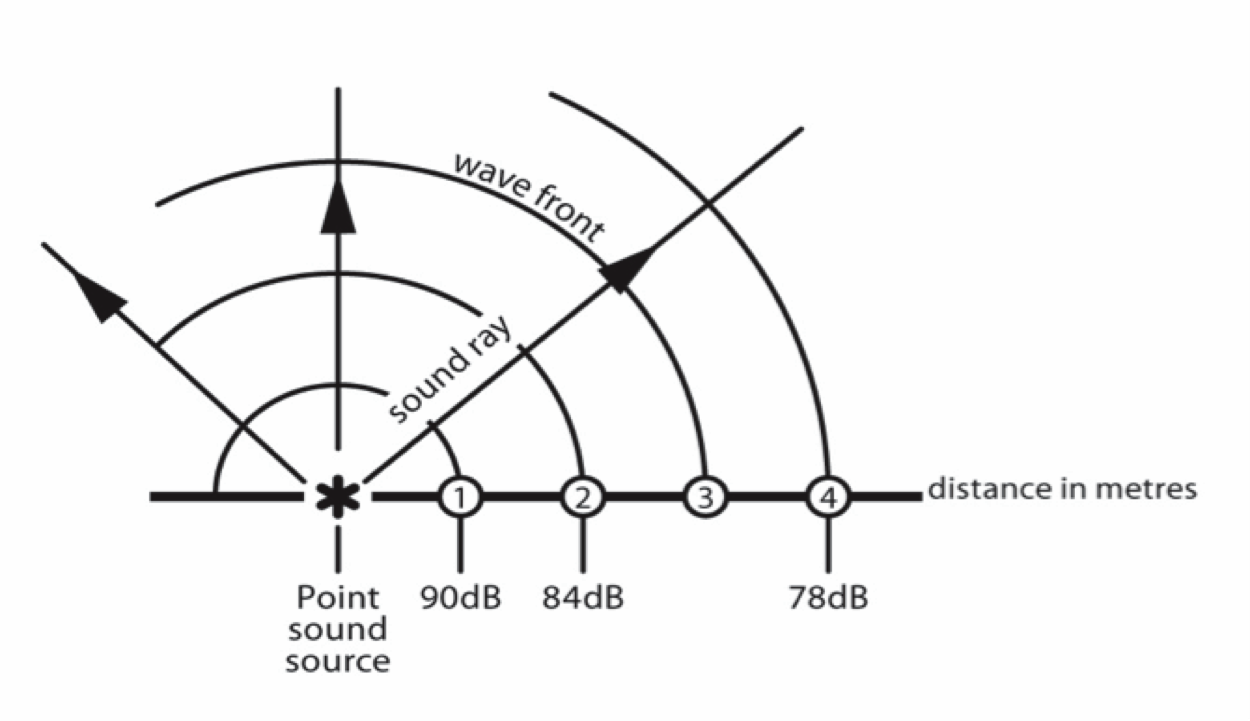
Administrative noise control measures reduce the amount of noise to which a person is exposed by reducing the time they are exposed to it. Examples include:
- organising schedules so that noisy work is done when only a few workers are present
- notifying workers and others in advance of noisy work so they can limit their exposure to it
- keeping workers out of noisy areas if their work does not require them to be there
- sign-posting noisy areas and restricting access
- providing quiet areas for rest breaks for workers exposed to noisy work
- limiting the time workers spend in noisy areas by moving them to a quiet work is before their daily noise exposure levels exceed the exposure standard.
- If you rely on administrative controls, you should conduct regular checks to ensure that they are being complied with.
Rest breaks
- Where tasks are similar in nature and alternative tasks are not available, it is important to have more set rest breaks away from work. Ideally, the job should be redesigned to include more variety of work to provide rest for body parts under stress. If there are no suitable alternative work tasks when carrying out repetitive work, such as data entry, work pauses should be provided.
- Rest breaks can vary from micro pauses such as waiting for a computer screen to come up, through to defined breaks such as morning tea or lunch. A break from a task to answer the phone or to get a glass of water also provides rest and recovery for muscles and body parts that have been active. A selection of these breaks should occur throughout the work day.
- Rest breaks do not need to break from productive work. A change of task for a few minutes is a very effective rest break for the body. Check however that the ‘different’ task really is different for the parts of the body that are under stress. Some job rotation schemes move employees around to similar work. For example, keying and writing both use similar small hand muscles.
- It should not be necessary to have pause gymnastics, stretches or exercises in your work routine where a variety of tasks and appropriate rest breaks are provided.
- When setting work hours or arranging overtime, also consider the amount of accumulative stress the task is placing on the body. As the working day extends it is even more important to have task variety, rest breaks and postural variation.
Privacy
- Consideration of the need for privacy is also essential to ensure the well-being of workers. People may feel uncomfortable if they do not have enough space to work in and store personal items. Privacy has the additional benefit of reducing distractions.